Thank you for commenting.
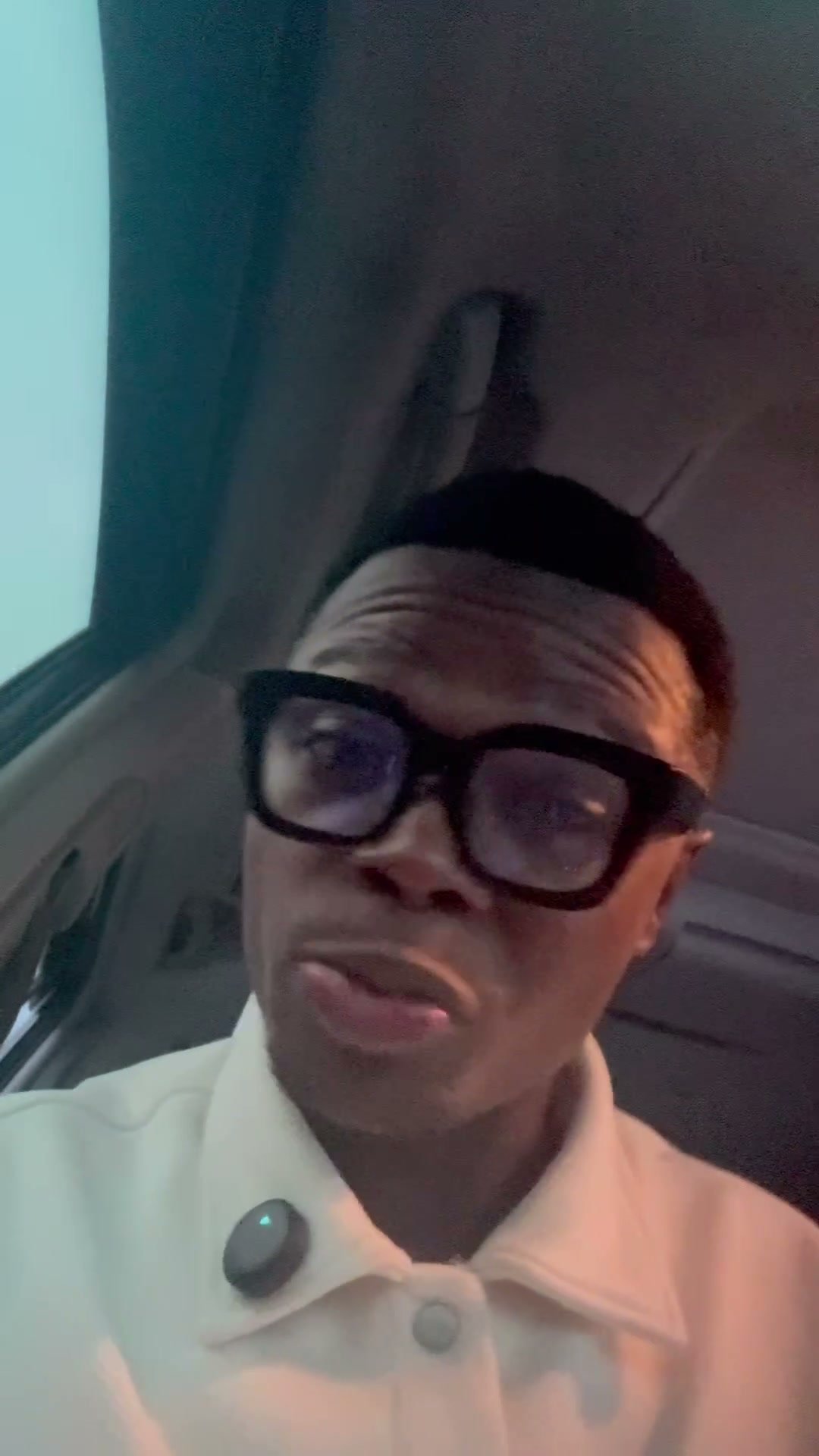
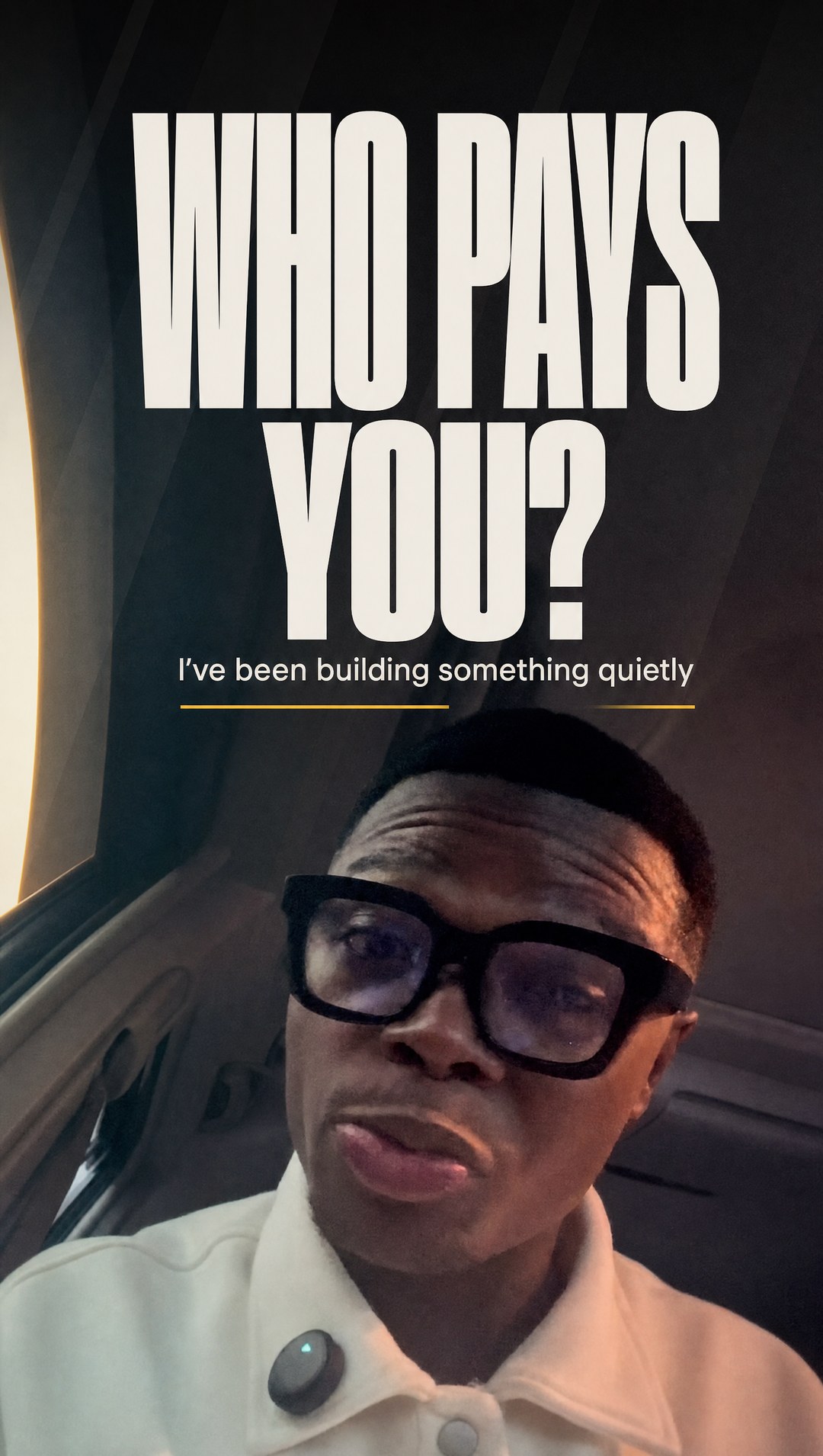
This is the exact workflow behind the cover of my Day 1 video.
One frame from the video.
One prompt.
One image model.
You need 3 things:
→ One still frame from your video
→ GPT Image 2 (I run it on Higgsfield)
→ A headline of 3 or 4 words
Step 1: Pick the frame
Go through your video and stop on a moment where:
→ your mouth is closed
→ your eyes look straight into the lens
→ your hands are out of the shot
→ there is empty space above your head
Mine catches me mid-word. A closed mouth looks calmer, so pick that.
Take a full-screen screenshot of that moment with nothing on top of it.
Step 2: Write the headline
Make it a question about the person watching.
Mine: WHO PAYS YOU?
Then one short line under it in small letters.
Mine: I've been building something quietly
Step 3: Run the prompt
Open GPT Image 2 on Higgsfield and upload your frame.
Paste the prompt below.
Swap my 2 text lines, my shirt and my car for yours.
My settings: 9:16, 2K, high quality.
Using the uploaded image, create an Instagram Reel cover.

FORMAT: 9:16 vertical, 1080 x 1920. Instagram's profile grid crops this cover to 3:4, which cuts off the top 13 percent and the bottom 13 percent of the image. Keep every piece of text between 16 percent and 48 percent of the image height. Nothing above 15 percent.

TEXT TO RENDER - reproduce these exactly, character for character:
  Heading: WHO PAYS YOU?
  Subheading: I've been building something quietly

Set the heading in a very heavy condensed sans-serif, all capitals, off-white #F2EDE7, in the band from 16 percent to 40 percent of the image height, above the man's head. Set the subheading directly below it, much smaller, regular weight, same off-white, finishing by 46 percent of the image height. A single thin accent line or underline in gold #E8A33D is permitted under the subheading. Nothing else.

The overall design should feel polished, professional, and scroll-stopping, similar to the cover designs used by top creators on Instagram and YouTube. Use clean spacing, bold typography, layered shapes, subtle lighting effects, and minimal but impactful decorative elements. Prioritize readability and a premium aesthetic over excessive effects.

IMPORTANT - PRESERVE THE UPLOADED IMAGE: Do not distort, replace, or reimagine the uploaded image. Use it faithfully while enhancing the overall presentation through layout, typography, color, and graphic design.

STRICT LOCK - these must come through completely unchanged from the upload: the man's face, skin tone and facial structure; his black square-framed glasses including their exact shape; his cream white collared polo shirt and its buttons; the car interior behind him; his head position, angle and framing within the frame. Do not slim, smooth, lighten, age, beautify or restyle him. Do not redraw him. Do not generate a different person. Do not add or remove facial hair. Do not change the glasses. If the layout needs more room, extend the background around him rather than moving or altering him.

TEXT RENDERING: every letter must be correctly formed and correctly spelled. Render the apostrophe in I've properly. Do not invent, duplicate, translate or approximate any word. Do not add any text that is not listed above. Keep even letter spacing and a straight baseline.

NEGATIVE - none of the following may appear: misspelled or garbled text, duplicated or mirrored letters, nonsense characters, extra headings, watermarks, logos, signatures, captions, subtitles, hashtags, emoji, stock-photo faces, a second person, altered facial features, beautified or airbrushed skin, different glasses, a different shirt, neon colours, purple, gradients on text, glowing edges, floating particles, sparkles, lens flare, confetti, abstract shapes not requested, borders, frames, drop shadows on the photo, collage elements, or any SaaS-style decorative blobs.
Step 4: Check it before you post
→ Every word is spelled right
→ It is still your face, your glasses and your clothes
→ No text sits in the top or bottom 13% of the image
That last one matters most.
Your profile grid shows every cover as a 3:4 rectangle. It cuts the top and the bottom off a 9:16 cover.
Anything in those strips disappears from your grid.
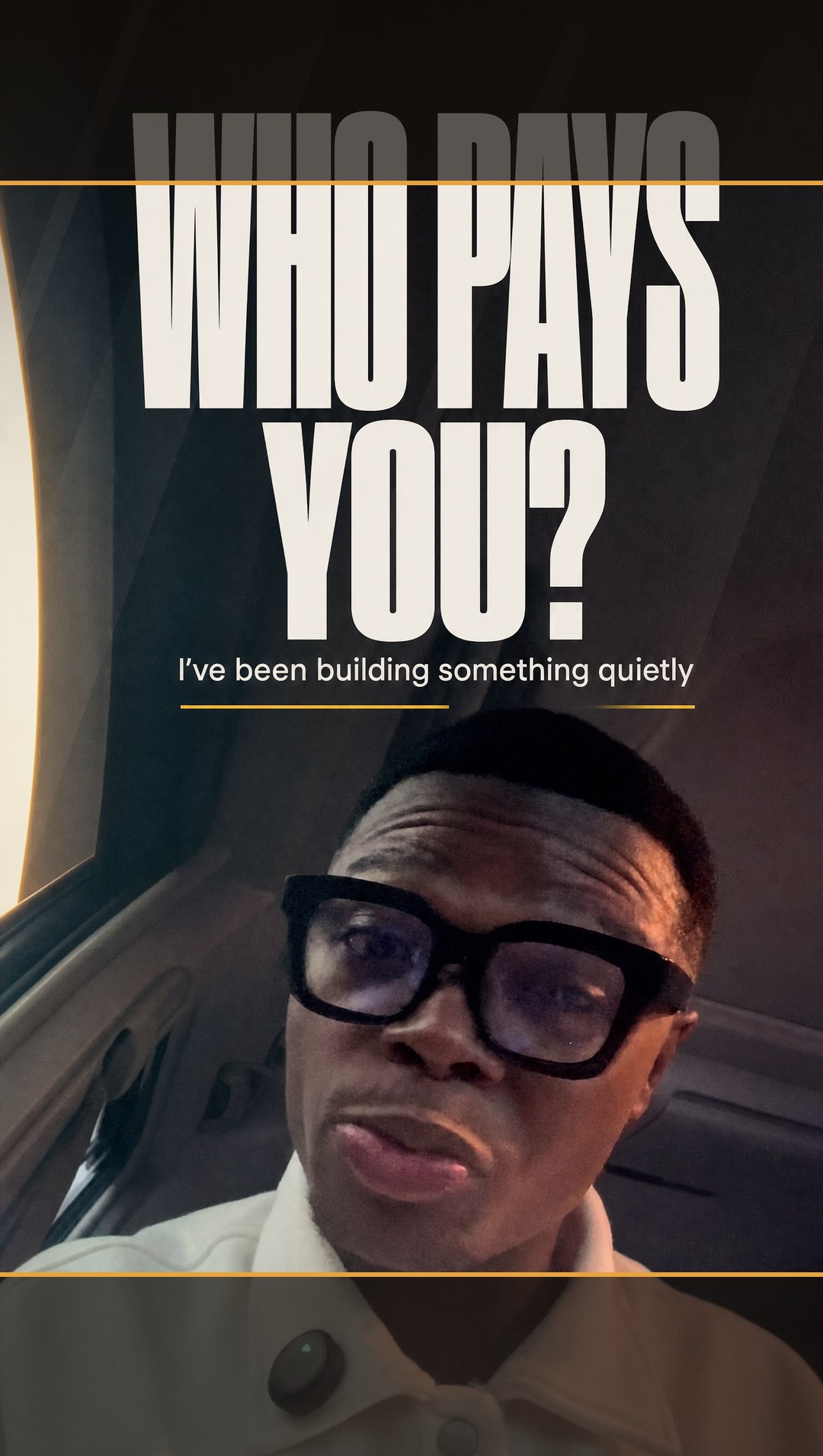
Mine broke this rule. The top of "WHO PAYS" gets cut on my grid.
The prompt above is the fixed version.
What the AI changes
In both of my runs, GPT Image 2 did not keep my photo exactly as it was.
It re-lit it.
Mine went from a flat phone selfie to a dark car with warm light coming through the window.
That light is why the cover looks expensive.
If you need your photo untouched, put the text on it yourself in Canva or CapCut instead.
Want the whole system?
This is one way to prompt AI out of many.
I'm putting all of it into my AI masterclass:
→ How to write prompts AI actually understands
→ The full creative director system I use
→ How to make AI videos people pay for
It's free for the first 100 people.